Also for job interviews

In technical meetings, answers from your code.

Meeting Copilot reads your project on your own computer and listens to the call. When someone asks how something works, you see what to say, with the file and line it came from.

For Mac and Windows. Your code is never uploaded. 3 free sessions, no card needed.

In the call Live

  1. Meeting 00:01

    Okay, main topic today is the failed payments ticket. Support says about two percent of charges fail on the first try.

  2. Meeting 00:08

    We need to add retries when a payment fails. Where should that logic live?

Question heard at 00:083.4 s

Where should the payment retry logic live?

Say this

We should put the retry in the payments queue worker, not inside the charge function. Right now a failed job just stays failed, and the charge function makes one attempt and records it as attempt 1. The worker is where we can safely try again. Before we add retries, we need to make sure a retry can't charge the customer twice.

Ask thisShould we add a Stripe idempotency key first, so a retry can't charge the customer twice?

In plain wordsIdempotency key: a label you send with a payment request so that sending the same request twice counts as one charge.

Checked in your code

src/queue/consumer.ts on your computer

1import { Queue, Worker } from "bullmq";
2import { chargeOrder } from "../payments/charge";
3 
4const connection = { host: process.env.REDIS_HOST ?? "localhost", port: 6379 };
5 
6export const paymentsQueue = new Queue("payments", { connection });
7 
8// Consumes "charge" jobs. No retry policy yet: a failed job stays failed.
9new Worker(
10  "payments",
11  async (job) => {
12    if (job.name === "charge") await chargeOrder(job.data.orderId);
13  },
14  { connection },
15);

A recorded sample meeting on a small demo project. The answers and source lines are the app's real output.

  • Your code is never uploaded
  • No bot joins the call
  • Hidden when you share your screen
  • Signed and notarized for macOS
Works with
  • Zoom
  • Google Meet
  • Microsoft Teams
  • Slack
  • Webex
and any other app that plays sound

Every answer names its file and line

Other assistants know what code usually looks like. Meeting Copilot answers from what is actually in yours, and shows where. One click opens the line in VS Code, Cursor or Zed, so you can check it before you say it.

If an answer points at something that is not in your project, it is flagged instead of shown as fact.

How we test it

questions answered from the right file
12 / 12
made-up file references
0
median time to an answer with its source
4.7 s

12 questions a team would ask, on a 533-file production codebase, with the default model. Run by us in October 2026.

Before, during and after the meeting

Before: it reads the project once

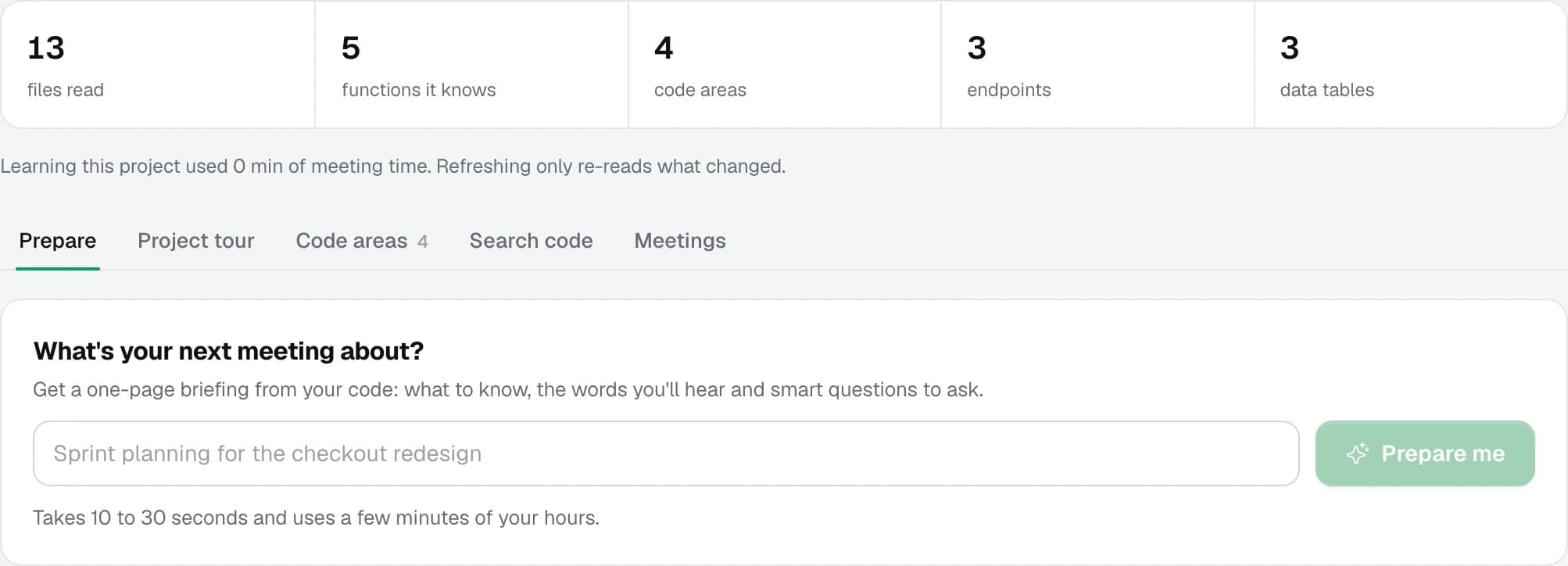
Add a folder. Meeting Copilot maps its files, functions, endpoints and data tables on your computer, and later re-reads only what changed.

Type what the next meeting is about and get a one-page briefing from your code: what to know, the words you will hear and good questions to ask.

A project in the app: 13 files read, 5 functions, 4 code areas, 3 endpoints and 3 data tables, and a box asking what the next meeting is about.

During: four kinds of help

Captions for both sides of the call run live. When the conversation touches your code, a card appears on its own. You can also type a question at any time.

Say this
A short answer to a question about the code, written to be said out loud, with its sources.
Ask this
A question worth raising, like the missing idempotency key in the meeting above.
In plain words
A term you haven't met, explained in one sentence and in the context of your project.
Catch me up
Looked away for a minute? The last few minutes of the call in a few lines.

After: notes that point at the code

When you stop listening, the notes are written: summary, decisions, open questions and action items with owners and the files they touch.

The next meeting on the same project starts from them, so "what did we decide?" has an answer.

Notes from the meeting above

Payment retries and idempotency before charging again

Decisions
  • Idempotency (protection against double charges) must be handled before retries are added.
  • The team will sync again on Friday.
Action items
  • Implement idempotency for payments by saving a unique key per order before calling Stripe and reusing it on every retryYou, by Fridaysrc/payments/charge.tssrc/queue/consumer.tsprisma/schema.prisma
  • Check the refunds endpoint for the same double-processing riskYou

Plus 3 open questions and a follow-up message, ready to send.
The same assistant, for job interviews

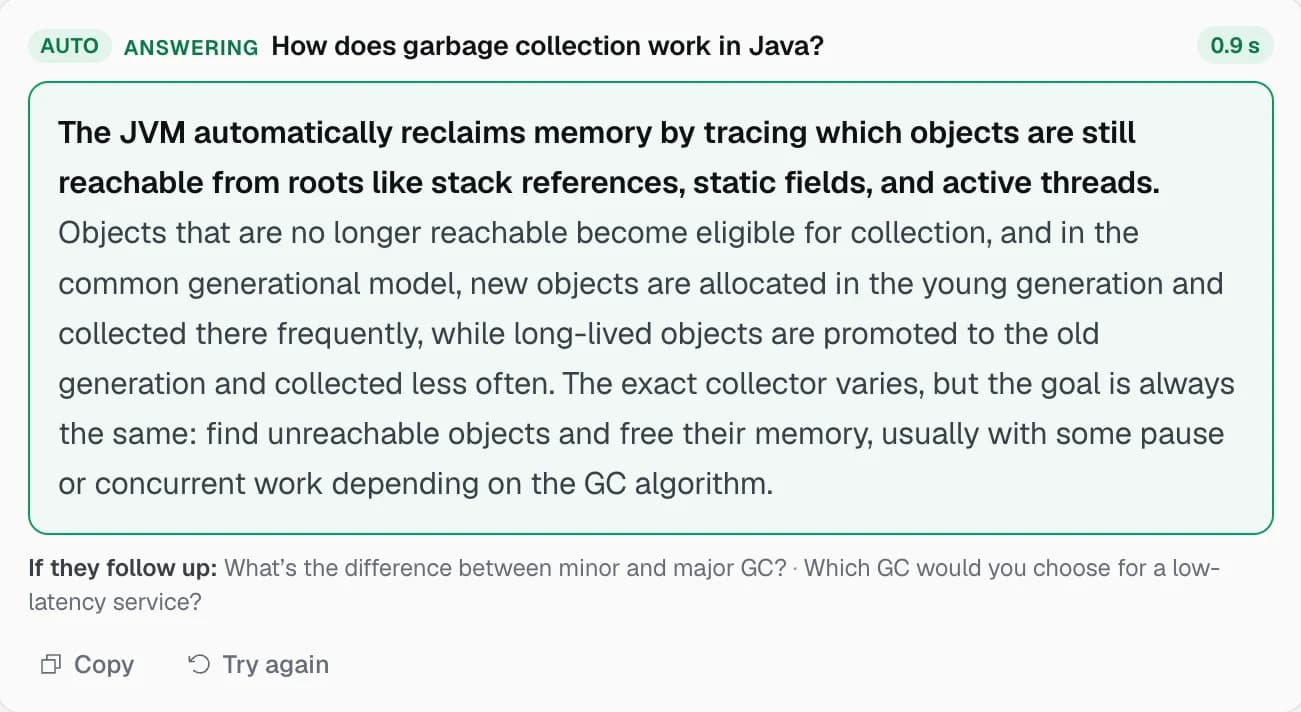
Add your CV and the job post. When the interviewer finishes a question, a short answer to say appears, built from your real experience, with the follow-ups they are likely to ask.

  • Coding questions read straight from a shared screen
  • Practice with an AI interviewer and get a score after each answer
  • Nine languages, including English, German and Turkish

Use it where AI help is allowed. Check the rules of your company, school or interviewer first.

A suggested answer during a practice interview, to the question: How does garbage collection work in Java?

Your code stays on your computer

The project is read and indexed locally. To write an answer, only the few lines it needs are sent, and they are not kept. The app's windows are hidden from screen sharing by default.

Read the privacy policy

Stays on your computer

  • Your code and project folders
  • The index built from them
  • Transcripts, notes and tasks

Sent to write an answer, then dropped

  • The question and the last lines of the conversation
  • The few lines of code the answer needs
  • Not stored or logged on our servers

Never leaves

  • Your repository: it is never uploaded
  • Audio recordings: sound is captioned live and never saved
  • Your call: no bot joins, nobody sees an extra guest

Pay once. Hours never expire.

Start with 3 free sessions of 10 minutes. After that, buy a pack of hours. Time counts only while the app is listening. No subscription.

Starter

One interview or a few meetings

$29one time
  • 3 hours of meetings or coaching
  • $9.67 per hour
  • Hours never expire
Buy 3 hours

Pro

A full job search, or meetings every day

$199one time
  • 30 hours of meetings or coaching
  • $6.63 per hour
  • Hours never expire
Buy 30 hours

Prices in US dollars; taxes are added at checkout where they apply. Payments are handled by Creem. Not happy? See the refund policy.

Questions

How it works in a call, what is sent where, and how hours are counted.

Features

Which meeting apps does it work with?

Any app that plays sound on your computer: Zoom, Google Meet, Microsoft Teams, Slack huddles and others. Nothing joins your call, so there is no bot for others to see.

Does it help in job interviews?

Yes. Start an interview session, add your CV and the job post, and press ⇧⌘↵ when a question lands. You get what to say, built from your CV, and a short tip.

Does it handle coding and system design questions?

Yes. It answers technical questions with real substance: the approach, the trade-off and the code itself. It can also read code that is shared on screen.

What languages does it support?

English, Turkish, German, French, Spanish, Portuguese, Italian, Dutch and Polish. It can also detect the language on its own.

What if the answer is wrong?

Every answer about your code links to the files and lines it came from, and sources that don't exist in your code are flagged. Open the code in one click and check before you say it.

Which AI models does it use?

Answers, briefings and notes are written by OpenAI's GPT models, with Anthropic's Claude as a backup. Live captions come from Speechmatics.

Privacy

Does my code leave my computer?

Your code is read and indexed on your computer. When an answer needs it, only the few relevant lines are sent to the AI model through our servers, which keep no copy. Your repository is never uploaded.

Is the meeting recorded?

No. Audio is used only for live captions while someone is speaking, and it is never saved. The transcript and the notes stay on your computer, and you can delete them.

Can others see it when I share my screen?

No. Meeting Copilot's windows are hidden from screen sharing by default. You can turn this off in Settings.

Where am I allowed to use it?

Wherever AI help is permitted. Check the rules of your company, school or interviewer first, and respect a no.

Billing

What counts as an hour?

Time is counted only while Meeting Copilot is listening or a coaching session runs, minute by minute. Asking questions about your code outside a meeting uses a few seconds.

Do hours expire?

No. Buy once and use them whenever you need them.

Is there a subscription?

No. You buy a pack of hours once. There is nothing to cancel.

Bring your codebase to the next meeting.

3 free sessions, no card needed. Works on Mac and Windows.